> ## Documentation Index
> Fetch the complete documentation index at: https://langchain-5e9cc07a-preview-devupd-1765394015-eccef47.mintlify.site/llms.txt
> Use this file to discover all available pages before exploring further.
# Trace with Google ADK
LangSmith supports tracing Google Agent Development Kit (ADK) applications through the OpenTelemetry integration. This guide shows you how to automatically capture traces from your [Google ADK](https://github.com/google/adk-python) agents and send them to LangSmith for monitoring and analysis.
## Installation
Install the required packages using your preferred package manager:
```bash pip theme={null}
pip install langsmith google-adk
```
```bash uv theme={null}
uv add langsmith google-adk
```
Requires LangSmith Python SDK version `langsmith>=0.4.26` for optimal OpenTelemetry support.
## Setup
### 1. Configure environment variables
Set your LangSmith API key and project name:
```bash Shell theme={null}
export LANGSMITH_API_KEY=
export LANGSMITH_PROJECT=
```
### 2. Configure OpenTelemetry integration
In your Google ADK application, import and configure the LangSmith OpenTelemetry integration. This will automatically instrument Google ADK spans for OpenTelemetry.
```python theme={null}
from langsmith.integrations.otel import configure
# Configure LangSmith tracing
configure(project_name="adk-example") # Optional: can also use LANGSMITH_PROJECT and LANGSMITH_API_KEY environment variables
```
Alternatively, you can use the Openinference GoogleADKInstrumentor:
```python theme={null}
from langsmith.integrations.otel import configure
from openinference.instrumentation.google_adk import GoogleADKInstrumentor
# Configure LangSmith tracing
configure(project_name="adk-example")
# Instrument Google ADK directly
GoogleADKInstrumentor().instrument()
```
You do not need to set any OpenTelemetry environment variables or configure exporters manually—`configure()` handles everything automatically.
### 3. Create and run your ADK agent
Once configured, your Google ADK application will automatically send traces to LangSmith:
This example includes a minimal app that sets up an agent, session, and runner, then sends a message and streams events.
```python theme={null}
import asyncio
from langsmith.integrations.otel import configure
from google.adk import Runner
from google.adk.agents import LlmAgent
from google.adk.sessions import InMemorySessionService
from google.genai import types
# Configure LangSmith tracing
configure(project_name="travel-assistant")
# Define your tools
def get_flight_info(destination: str, departure_date: str) -> dict:
"""Get flight information for a destination."""
return {
"destination": destination,
"departure_date": departure_date,
"price": "$450",
"duration": "5h 30m",
"airline": "Example Airways"
}
def get_hotel_recommendations(city: str, check_in: str) -> dict:
"""Get hotel recommendations for a city."""
return {
"city": city,
"check_in": check_in,
"hotels": [
{"name": "Grand Plaza Hotel", "rating": 4.5, "price": "$120/night"},
{"name": "City Center Inn", "rating": 4.2, "price": "$95/night"}
]
}
async def main():
# Create your ADK agent
agent = LlmAgent(
name="travel_assistant",
tools=[get_flight_info, get_hotel_recommendations],
model="gemini-2.5-flash-lite",
instruction="You are a helpful travel assistant that can help with flights and hotels.",
)
# Set up session service and runner
session_service = InMemorySessionService()
runner = Runner(
app_name="travel_app",
agent=agent,
session_service=session_service
)
# Create a session
user_id = "traveler_456"
session_id = "session_789"
await session_service.create_session(
app_name="travel_app",
user_id=user_id,
session_id=session_id
)
# Send a message to the agent
new_message = types.Content(
parts=[types.Part(text="I need to book a flight to Paris for March 15th and find a good hotel.")],
role="user",
)
# Run the agent and process events
events = runner.run(
user_id=user_id,
session_id=session_id,
new_message=new_message,
)
for event in events:
print(event)
if __name__ == "__main__":
asyncio.run(main())
```
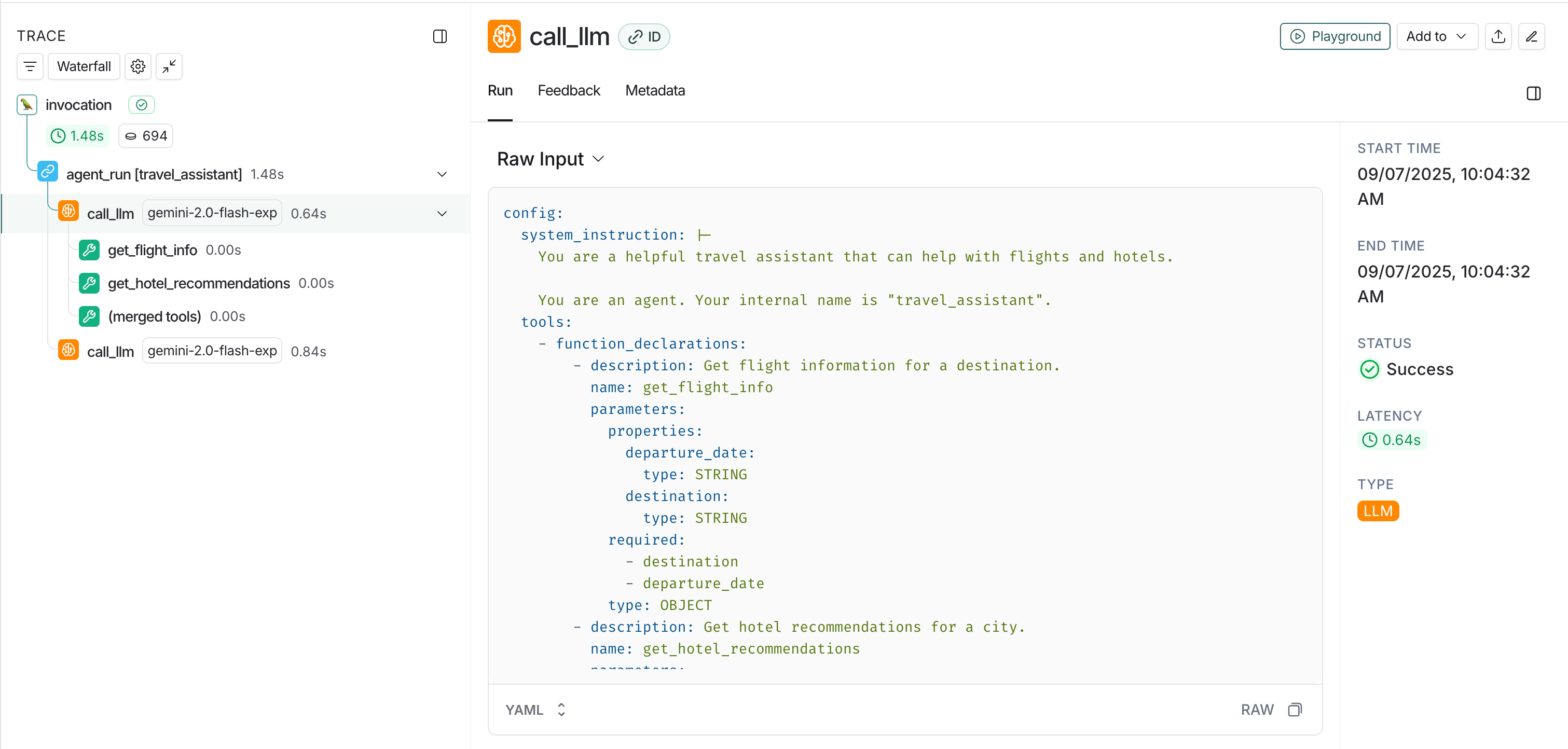
## View traces in LangSmith
* **Agent conversations**: Complete conversation flows between users and your ADK agents.
* **Tool calls**: Individual function calls made by your agents.
* **Model interactions**: LLM requests and responses using Gemini models.
* **Session information**: User and session context for organizing related traces.
* **Model interactions**: LLM requests and responses using Gemini models
 ## Advanced usage
### Custom metadata and tags
You can add custom metadata to your traces by setting span attributes in your ADK application:
```python theme={null}
from opentelemetry import trace
# Get the current tracer
tracer = trace.get_tracer(__name__)
async def main():
with tracer.start_as_current_span("travel_booking_session") as span:
# Add custom metadata
span.set_attribute("langsmith.metadata.user_type", "premium")
span.set_attribute("langsmith.metadata.booking_source", "mobile_app")
span.set_attribute("langsmith.span.tags", "travel,booking,premium")
agent = LlmAgent(
name="travel_assistant",
tools=[get_flight_info, get_hotel_recommendations],
model="gemini-2.5-flash-lite",
instruction="You are a helpful travel assistant that can help with flights and hotels.",
)
session_service = InMemorySessionService()
runner = Runner(
app_name="travel_app",
agent=agent,
session_service=session_service
)
# Continue with your ADK workflow
# ...
```
***
[Edit the source of this page on GitHub.](https://github.com/langchain-ai/docs/edit/main/src/langsmith/trace-with-google-adk.mdx)
[Connect these docs programmatically](/use-these-docs) to Claude, VSCode, and more via MCP for real-time answers.
## Advanced usage
### Custom metadata and tags
You can add custom metadata to your traces by setting span attributes in your ADK application:
```python theme={null}
from opentelemetry import trace
# Get the current tracer
tracer = trace.get_tracer(__name__)
async def main():
with tracer.start_as_current_span("travel_booking_session") as span:
# Add custom metadata
span.set_attribute("langsmith.metadata.user_type", "premium")
span.set_attribute("langsmith.metadata.booking_source", "mobile_app")
span.set_attribute("langsmith.span.tags", "travel,booking,premium")
agent = LlmAgent(
name="travel_assistant",
tools=[get_flight_info, get_hotel_recommendations],
model="gemini-2.5-flash-lite",
instruction="You are a helpful travel assistant that can help with flights and hotels.",
)
session_service = InMemorySessionService()
runner = Runner(
app_name="travel_app",
agent=agent,
session_service=session_service
)
# Continue with your ADK workflow
# ...
```
***
[Edit the source of this page on GitHub.](https://github.com/langchain-ai/docs/edit/main/src/langsmith/trace-with-google-adk.mdx)
[Connect these docs programmatically](/use-these-docs) to Claude, VSCode, and more via MCP for real-time answers.