> ## Documentation Index
> Fetch the complete documentation index at: https://langchain-5e9cc07a-preview-devupd-1765394015-eccef47.mintlify.site/llms.txt
> Use this file to discover all available pages before exploring further.
# Configure threads
Many LLM applications have a chatbot-like interface in which the user and the LLM application engage in a multi-turn conversation. In order to track these conversations, you can use the `Threads` feature in LangSmith.
## Group traces into threads
A `Thread` is a sequence of traces representing a single conversation. Each response is represented as its own trace, but these traces are linked together by being part of the same thread.
To associate traces together, you need to pass in a special `metadata` key where the value is the unique identifier for that thread. The key name should be one of:
* `session_id`
* `thread_id`
* `conversation_id`.
The value can be any string you want, but we recommend using UUIDs, such as `f47ac10b-58cc-4372-a567-0e02b2c3d479`. Check out [this guide](./add-metadata-tags) for instructions on adding metadata to your traces.
### Example
This example demonstrates how to log and retrieve conversation history using a structured message format to maintain long-running chats.
```python Python theme={null}
import os
from typing import List, Dict, Any, Optional
import openai
from langsmith import traceable, Client
import langsmith as ls
from langsmith.wrappers import wrap_openai
# Initialize clients
client = wrap_openai(openai.Client())
langsmith_client = Client()
# Configuration
LANGSMITH_PROJECT = "project-with-threads"
THREAD_ID = "thread-id-1"
langsmith_extra={"project_name": LANGSMITH_PROJECT, "metadata":{"session_id": THREAD_ID}}
# gets a history of all LLM calls in the thread to construct conversation history
def get_thread_history(thread_id: str, project_name: str):
# Filter runs by the specific thread and project
filter_string = f'and(in(metadata_key, ["session_id","conversation_id","thread_id"]), eq(metadata_value, "{thread_id}"))'
# Only grab the LLM runs
runs = [r for r in langsmith_client.list_runs(project_name=project_name, filter=filter_string, run_type="llm")]
# Sort by start time to get the most recent interaction
runs = sorted(runs, key=lambda run: run.start_time, reverse=True)
# Reconstruct the conversation state
latest_run = runs[0]
return latest_run.inputs['messages'] + [latest_run.outputs['choices'][0]['message']]
@traceable(name="Chat Bot")
def chat_pipeline(messages: list, get_chat_history: bool = False):
# Whether to continue an existing thread or start a new one
if get_chat_history:
run_tree = ls.get_current_run_tree()
# Get existing conversation history and append new messages
history_messages = get_thread_history(run_tree.extra["metadata"]["session_id"], run_tree.session_name)
all_messages = history_messages + messages
# Include the complete conversation in the input for tracing
input_messages = all_messages
else:
all_messages = messages
input_messages = messages
# Invoke the model
chat_completion = client.chat.completions.create(
model="gpt-4o-mini", messages=all_messages
)
# Return the complete conversation including input and response
response_message = chat_completion.choices[0].message
return {
"messages": input_messages + [response_message]
}
# Format message
messages = [
{
"content": "Hi, my name is Sally",
"role": "user"
}
]
get_chat_history = False
# Call the chat pipeline
result = chat_pipeline(messages, get_chat_history, langsmith_extra=langsmith_extra)
```
```typescript TypeScript theme={null}
import 'dotenv/config';
import OpenAI from 'openai';
import { traceable, getCurrentRunTree } from 'langsmith/traceable';
import { Client } from 'langsmith';
import { wrapOpenAI } from 'langsmith/wrappers';
// Initialize clients
const openai = new OpenAI();
const client = wrapOpenAI(openai);
const langsmithClient = new Client();
// Configuration
const LANGSMITH_PROJECT = "project-with-threads";
const THREAD_ID = "thread-id-1";
const langsmithExtra = {
project_name: LANGSMITH_PROJECT,
metadata: { session_id: THREAD_ID }
};
// Message type definition
interface Message {
role: 'user' | 'assistant' | 'system';
content: string;
}
interface ChatResponse {
messages: Message[];
}
interface ChatInput {
get_chat_history: boolean;
messages: Message[];
}
// gets a history of all LLM calls in the thread to construct conversation history
async function getThreadHistory(threadId: string, projectName: string): Promise {
// Filter runs by the specific thread and project
const filterString = `and(in(metadata_key, ["session_id","conversation_id","thread_id"]), eq(metadata_value, "${threadId}"))`;
// Only grab the LLM runs
const runs: any[] = [];
for await (const run of langsmithClient.listRuns({
projectName: projectName,
filter: filterString,
runType: "llm"
})) {
if (run.run_type === "llm") {
runs.push(run);
}
}
// Sort by start time to get the most recent interaction
runs.sort((a: any, b: any) => new Date(b.start_time).getTime() - new Date(a.start_time).getTime());
// Check if we have any runs
if (runs.length === 0) {
return [];
}
// The current state of the conversation
const latestRun = runs[0];
const inputMessages = latestRun.inputs.messages as Message[];
const outputMessage = latestRun.outputs.choices[0].message as Message;
return [...inputMessages, outputMessage];
}
// Updated chat pipeline that accepts JSON input format
const chatPipeline = traceable(async (input: ChatInput): Promise => {
const { messages, get_chat_history } = input;
let allMessages: Message[];
let inputMessages: Message[];
// Whether to continue an existing thread or start a new one
if (get_chat_history) {
const runTree = getCurrentRunTree();
// Get existing conversation history and append new messages
const sessionId = runTree.extra?.metadata?.session_id || THREAD_ID;
const historyMessages = await getThreadHistory(
sessionId,
runTree.project_name
);
allMessages = historyMessages.concat(messages);
// Include the complete conversation in the input for tracing
inputMessages = allMessages;
} else {
allMessages = messages;
inputMessages = messages;
}
// Invoke the model
const chatCompletion = await client.chat.completions.create({
model: "gpt-4o-mini",
messages: allMessages
});
// Return the complete conversation including input and response
const responseMessage = chatCompletion.choices[0].message as Message;
return {
messages: [...inputMessages, responseMessage]
};
}, { name: "Chat Bot" });
// Example input in the requested JSON format
const input: ChatInput = {
get_chat_history: false,
messages: [
{
content: "Hi, my name is Sally",
role: "user"
}
]
};
// Call the chat pipeline
const result = await chatPipeline(input);
```
After waiting a few seconds, you can make the following calls to continue the conversation. By passing `get_chat_history=True,`/`getChatHistory: true`,
you can continue the conversation from where it left off. This means that the LLM will receive the entire message history and respond to it,
instead of just responding to the latest message.
```python Python theme={null}
# Continue the conversation.
messages = [
{
"content": "What is my name?",
"role": "user"
}
]
get_chat_history = True
chat_pipeline(messages, get_chat_history, langsmith_extra=langsmith_extra)
```
```typescript TypeScript theme={null}
// Continue the conversation.
const input: ChatInput = {
get_chat_history: true,
messages: [
{
content: "What is my name?",
role: "user"
}
]
};
await chatPipeline(input);
```
Keep the conversation going. Since past messages are included, the LLM will remember the conversation.
```python Python theme={null}
# Continue the conversation.
messages = [
{
"content": "What was the first message I sent you?",
"role": "user"
}
]
get_chat_history = True
chat_pipeline(messages, get_chat_history, langsmith_extra=langsmith_extra)
```
```typescript TypeScript theme={null}
// Continue the conversation.
const input: ChatInput = {
get_chat_history: true,
messages: [
{
content: "What was the first message I sent you?",
role: "user"
}
]
};
await chatPipeline(input);
```
## View threads
You can view threads by clicking on the **Threads** tab in any project details page. You will then see a list of all threads, sorted by the most recent activity.
### View a thread
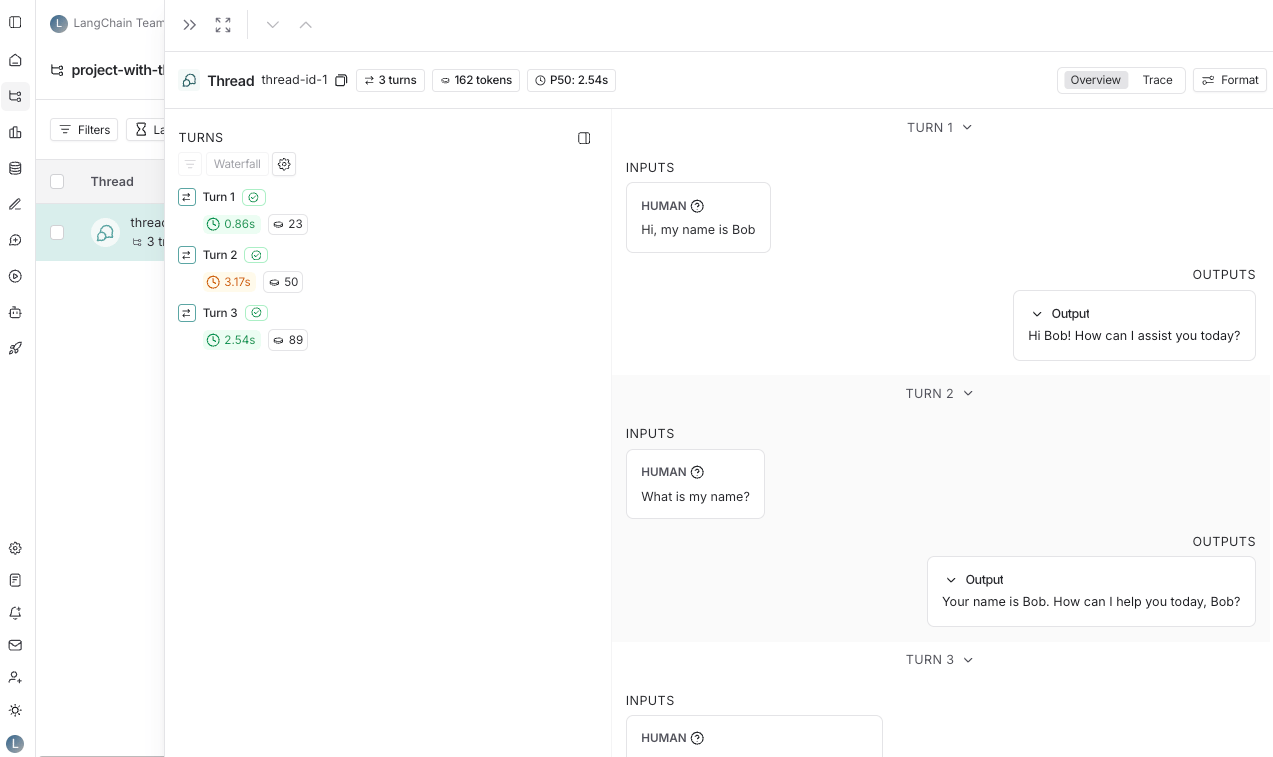
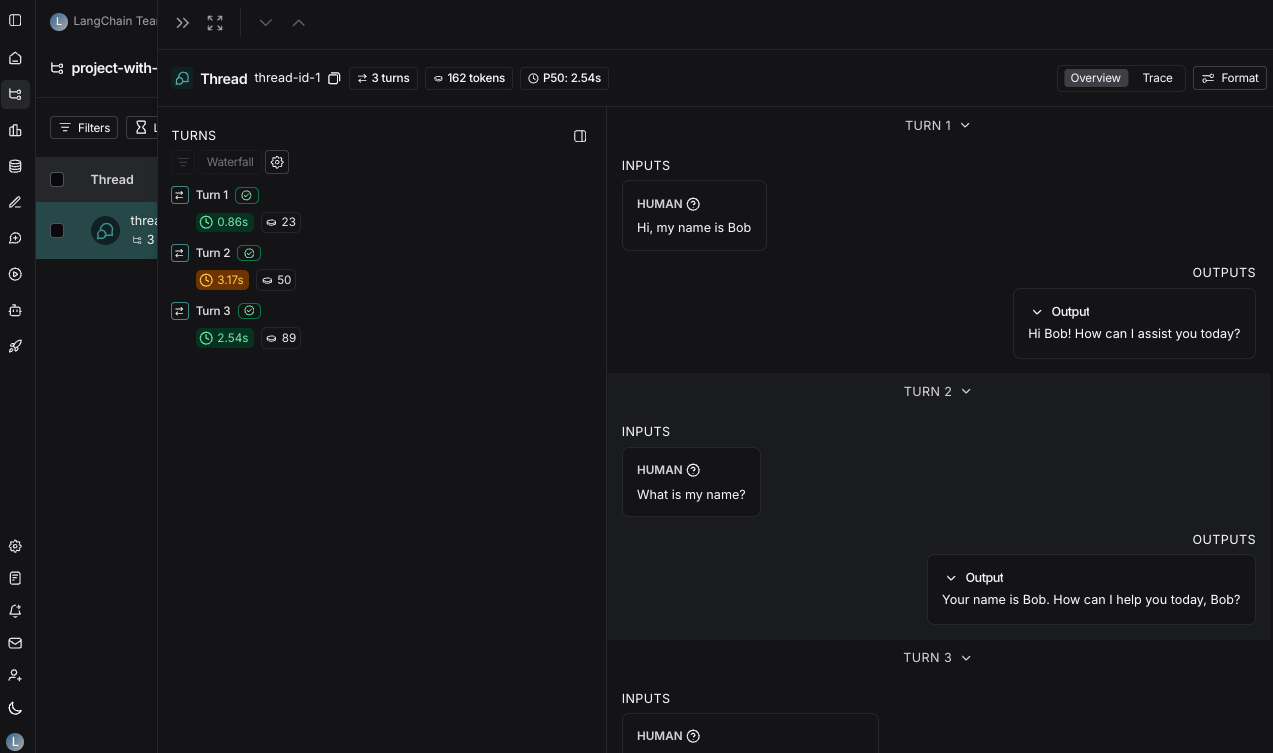
You can then click into a particular thread. This will open the history for a particular thread.
Threads can be viewed in two different ways:
* [Thread overview](/langsmith/threads#thread-overview)
* [Trace view](/langsmith/threads#trace-view)
You can use the buttons at the top of the page to switch between the two views or use the keyboard shortcut `T` to toggle between the two views.
#### Thread overview
The thread overview page shows you a chatbot-like UI where you can see the inputs and outputs for each turn of the conversation. You can configure which fields in the inputs and outputs are displayed in the overview, or show multiple fields by clicking the **Configure** button.
The JSON path for the inputs and outputs supports negative indexing, so you can use `-1` to access the last element of an array. For example, `inputs.messages[-1].content` will access the last message in the `messages` array.
#### Trace view
The trace view here is similar to the trace view when looking at a single run, except that you have easy access to all the runs for each turn in the thread.
### View feedback
When viewing a thread, across the top of the page you will see a section called `Feedback`. This is where you can see the feedback for each of the runs that make up the thread. This feedback is aggregated, so if you evaluate each run of a thread for the same criteria, you will see the average score across all the runs displayed. You can also see [thread level feedback](/langsmith/online-evaluations#configure-multi-turn-online-evaluators) left here.
### Save thread level filter
Similar to saving filters at the project level, you can also save commonly used filters at the thread level. To save filters on the threads table, set a filter using the filters button and then click the **Save filter** button.
You can open up the trace or annotate the trace in a side panel by clicking on `Annotate` and `Open trace`, respectively.
***
[Edit the source of this page on GitHub.](https://github.com/langchain-ai/docs/edit/main/src/langsmith/threads.mdx)
[Connect these docs programmatically](/use-these-docs) to Claude, VSCode, and more via MCP for real-time answers.